Alyssa DePury EME2040 Blog

Thursday, November 14, 2019

Blog Journal 11

Learning about data collection and reporting has been very beneficial in helping me understand how I will work as a teacher. I think I will be teaching a younger classroom, such as a second grade classroom. I would like to use surveys to collect data to both help me get to know my students better at the beginning of the year, and also to see how each student is doing in specific subject matter, such as math or reading. At the beginning of the year, I think I will create a survey with questions like, "what is your name?", "how old are you", and "what is your favorite thing to do?". Then, I will use data reporting through Excel in order to see which students are similar and which are different. This activity will help me understand the class dynamic for the year. Also, for a specific subject, such as math, I will do an assessment on what the students know for a certain unit. I will then use data reporting through Excel to see which students are struggling and which problems are the hardest for the class. In these ways, I will be able to use data collection and reporting tools to aid in my teaching skills. 

From reviewing my classmates' blogs, I found many topics they discussed interesting. First of all, I loved reading about each person's independent learning project. I enjoyed seeing the different designs students came up with and reading about what professional development activity they participated in. I feel like I truly learned more about each person and how they are wired based off of these blog posts. I found that many students used a software called Pictochart (an infographic maker) to create their design project. I love the fact that infographics are becoming an acceptable way of teaching students. Another topic I found interesting from the blogs is that of how students are utilizing the in-class activities we have been doing in their own lives. It was interesting to hear about what students enjoyed from DIIGO and Flipgrid classroom and how they will utilize these technologies when they become teachers. While all of the blog posts were quite interesting and informative, these were some of the topics that stood out to me and impacted me.

The technology-related skill I would like to learn next is photography and photo-shop. I would like to learn this technology because I would like to capture more moments from my life and from my friends' lives. I would then like to be able to edit these photos to be as beautiful as they can be. In this future, I know I will be working with kids, so to have these skills would be a great aid in connecting with students and parents alike. It would also be wonderful to be able to make a little more money by taking photos of weddings and families. I will achieve this goal by taking some professional development courses online and asking my photography friends for advice and to teach me. I will also begin to practice with the camera that I have and download photo-shop on my computer. By completing these tasks, I know that I will be taking a step in the right direction, and I will be working toward my goals for the future. 

at November 14, 2019 No comments:
Email ThisBlogThis!Share to XShare to FacebookShare to Pinterest

Thursday, November 7, 2019

Blog Journal 10


"The Flipped Classroom" was a very interesting experience for me and my fellow classmates to say the least. I really enjoyed the software because I had never completed an assignment quite like it. I loved the fact that it kept the class connected even though we were away for a week. The instructional design is really easy and fun to use. The teacher posted a prompt, and then we had to make a video of ourselves responding to the prompt. After we responded, we had to post our video on the flipped classroom platform. We could see all our classmates responses, and we could respond to each other via video. This technology is really innovative because it still keeps a class together without actually physically being in the same room. 

Open education resources are wonderful tools for classrooms, students, and teachers alike. These resources are basically open to the public to use for free. The only restrictions put on these resources are what the authors put on them, but at the very least one can still read the resources. Anyone can search for these educational resources and utilize them for themselves or within their classrooms. These resources are incredibly valuable because people of all different privileges can use them equally. An article I found that discusses OER is edweek.org/ew/issues/open-educational-resources-oer/index.html. This article provides a very informative overview of what OER truly is. It first provides a wonderful video to better explain the concept. Then it goes into what OER is, what its uses are, and what its drawbacks could be. It basically explains the fact that OER can be used in classroom settings, but it also could cause issues because anyone can create OER content. Overall, I think OER is a great way for students to get learning materials for free.

I have really enjoyed working on the PowerPoint assignments, and I feel like I have gained some new skills that I will use in the future. I learned so many things from these projects, including how to add footnotes to the PowerPoint handouts and how to add speaker notes. I also never knew how to create a narrated presentation until these assignments. Something that I loved about this assignment was the fact that I had creative freedom to choose the subject I wanted to "lecture" on and what information I put into the presentation. One thing that I didn't like about this assignment was the fact that it was very tedious to add in all of the details needed to pass. It took me a while to complete the assignment because of this fact. One thing that I like about assignment #5 is the fact that we get to create a fun game and again use our creativity to relay information to students. One thing that I don't like about assignment #5 is the fact that it is difficult to keep track of all of the pages that need to be linked to each other. I think I can improve my assignment #4 by spending more time on the presentation part of the assignment. I think that I could have written out a script so that I wasn't rushing through the information. Therefore, while both of these assignments are tedious, they are also really great ways to practice PowerPoint for the future. (I have not started on assignment #5 yet, so I will just provide a screenshot for assignment #4. The screenshot is of the introduction page for my presentation.)

Assignment 4


Assignment 5


at November 07, 2019 No comments:
Email ThisBlogThis!Share to XShare to FacebookShare to Pinterest

Thursday, October 31, 2019

Blog Journal 9

I have learned many new skills because of all of the assignments we have completed in class using Diigo. First of all, I have learned how to pick out important information in a web page filled with information. I have also learned to comment relevant ideas about information so that I not only reiterate the concepts, but I also add in my own ideas and experiences. A third skill that I have found relevant is that of being able to collaborate with my peers in order to share information that could benefit all of us. I have enjoyed seeing what others have posted in our Diigo group, commenting on their posts, and them commenting on mine. This application can be incredibly useful in the future for me, especially in my classroom, with team members, and in my individual professional efforts. Diigo can be used for so many different purposes. I can envision myself giving my students an English activity where they must find different, relevant literature and share it in the Diigo group, and comment and highlight important information. I can also see myself communicating with team members and others in my profession to better my knowledge of teaching. We could share ideas and lesson plans in our Diigo group that we find online, and we could support each other through our comments on each others' annotations. I can absolutely see myself using this application in the future. It is a wonderful tool!

Bloom's Taxonomy is a very interesting idea, and I think it is important to keep this idea in mind when thinking about learning. This idea is a pyramid, with different concepts on each level of the pyramid. Starting from the bottom and working to the top, the concepts include "remember", "understand", "apply", "analyze", "evaluate", and "create". As the concepts get higher up on the pyramid, the more rigorous they become. Student learning at each level of Bloom's Taxonomy can be supported with PowerPoint in a particular lesson. A lesson I think of right now is an English lesson for a high school class. "Remember", the first concept on the pyramid, could be represented through a slide that asks students to recall a specific character or story they have read. Next, "understand" can be represented with a slide that asks questions about each of the characters or plot details in a story. Thirdly, "apply" could be represented through a slide that asks application questions about the story, and the students could discuss in small groups. An example of a relevant question could be "Why do you think this character feel a certain way during this point in the story?". Next, "analyze" is a step further. This concept could be represented through a slide that tells the students to compare and contrast a few of the characters. Then, "evaluate" can be represented through a slide that tells each student to defend their stance on why they compared or contrasted characters the way that they did. Lastly, "create" could be represented with a slide that explains information on an upcoming project that the students will have to complete and create that is relevant to what they learned in class on this day. As one can see, there are many ways that Bloom's Taxonomy can be utilized in the classroom and on PowerPoint. 

Technology can be directly related to teacher professional development. There are many examples of how teachers can use technology and different web pages or social medias to connect with their peers, colleagues, and fellow professionals. By staying up-to-date with technology, teachers will not feel alone in their profession, they will connect with others, and they will never cease to learn new things about educating. A site that I have found that can be used to stay informed of technology trends is Microsoft.com. Microsoft is one of the leading technology producers today. On this website, Microsoft does not only keep people up to date on the latest technology products they have produced, but it also provides information and courses for teachers that want to use these new emerging technologies in their classrooms. There are many different lessons and courses one can access from the website in order to develop their knowledge of education technology further. The website also focuses highly on STEM education, so it has a lot of resources surrounding this goal for learning. 


link to the website: https://www.microsoft.com/en-us/education/educators/stem?&OCID=AID2000043_SEM_6Nfe8IGM&utm_source=bing&msclkid=1a6e1b18d0381d8fa26d46a3e58aab50
at October 31, 2019 No comments:
Email ThisBlogThis!Share to XShare to FacebookShare to Pinterest

Tuesday, October 29, 2019

ILP "Participation" - LinkedIn Learning Course

For my second Independent Learning Project, I had to participate in a professional development activity. We had a wide range of options to choose from, and I ended up choosing to participate in a LinkedIn learning course. The course was called "Getting Things Done", by David Allen. I really enjoyed the process of going through this course, because I have never completed something quite like it, and I feel like I learned a lot about how to stay organized and on task. To complete my project, I had to make a free trial account on the LinkedIn Learning website (the trial will last me a month). I then had to choose which course I wanted to take. Once I clicked on the course, I was automatically taken to a page to complete it. There were many videos to watch, and a toolbar on the side in case I wanted to follow along or take notes. Once I completed the course, "Getting Things Done", I then had to make a PowerPoint presentation on what I learned. After creating the PowerPoint, I uploaded it to voicethread.com in order to comment on each of my slides. My voice thread is linked below, so check it out! Overall, I thoroughly enjoyed this project. I feel as though it benefited me for my future career as a teacher, because teachers always have a lot of tasks to complete, and "Getting Things Done" helped me to understand how to complete tasks in a timely, organized manner. Thanks for reading!

My Voice Thread
at October 29, 2019 4 comments:
Email ThisBlogThis!Share to XShare to FacebookShare to Pinterest

Thursday, October 24, 2019

Blog Journal 8


My experience with Twitter has been very interesting so far. I have never had a Twitter account until this class, so I think it is really cool that I am getting to learn about this type of social media along with all of the other things we are learning in this technology class. There are huge correlations between what we are learning and what I see on Twitter. From using Twitter, I have learned that a person doesn't have to use social media just to benefit themselves and gain followers and likes. Instead, professionals can use Twitter in order to learn more about their profession and get opinions from people that are in their same position. I have also learned how to interact well with people on social media, tweet them, and respond to their tweets. There are many benefits to using Twitter. One benefit is the fact that a person can connect with others just like themselves so that they don't have to feel alone in their profession. Twitter connects people from far and wide into one spot on the internet so that they can have conversations and share information. Another benefit of using Twitter is the fact that there is no lack of information to be found. If a person is looking to find more information on a certain topic, they can just follow a page that focuses on that topic. They can also participate in Twitter conferences and chats. I am not experiencing any issues with Twitter. Everything is quite simple to use, and I feel as though people have been very receptive to my tweets. 

The Web Design assignment was very interesting, and I had a really good time creating my own website. I also gained some skills while working on this assignment. One of the skills I gained is how to use the software, "Weebly". I had never used this software before this assignment, so I had to teach myself how to use it in order to create my website. Another skill I gained is utilizing C.R.A.P. design principles to create the most visually appealing site possible. I made sure to only use a few fonts and to space paragraphs and pictures out well. Something I liked about this project was the fact that we could use our own creativity to make the website how we wanted. I loved being able to choose the colors and pictures I wanted to utilize. One thing I did not enjoy about this assignment was how we had a lot of parameters to follow. These parameters made the task tedious and a bit less enjoyable, even though I still liked the creation of the website a lot. I think in the future, I could improve the website by spending more time on it, adding more information, and putting some interactive elements on the page, such as a slideshow or buttons. What I learned from this assignment can be used in my future career because I learned the fundamentals of website design. Now, once I become a teacher, I can be confident in creating a class website. I will know how to place information to be visually appealing, and I will be able to use the website to put important announcements up for parents and students. 

link to my website: http://msdepurysclass.weebly.com/


Assistive and adaptive technologies are wonderful technological advances that can be used to benefit and support learners. These types of technologies are used to help students that have disabilities, either physical or mental. This technology allows for disabled learners to use technology in a way that is beneficial to them so that they can learn in (almost) the same way as students without disabilities. An example of assistive and adaptive technologies is voice to text dictation so that students that don't have the ability to see can still participate in writing papers or projects online. Another example is word processing formats that allow for spell check and proofreading so that students with disabilities such as dyslexia can have an equal opportunity at writing a coherent paper. I don't really know of anyone that uses these technologies except for the people that live at the nursing home my mom works at. These people don't have the same eyesight that they used to have, so they use functions on their phones and tablets to enlarge the words they are reading. I feel like there are some challenges that are involved in using adaptive technologies in the classroom. One of these challenges is the fact that the teacher must learn the technology before introducing it to her students. This technology might take a while to fully learn and understand, so there would be a time issue, and disabled students might fall behind their non-disabled peers. Another challenge is the fact that the technology might take up more space in a classroom. There might be less room to move around freely in the classroom which could be frustrating for all. While there are some drawbacks to these types of technologies, I still believe they should be implemented where they can, so that all students can learn with an equal advantage.  

at October 24, 2019 No comments:
Email ThisBlogThis!Share to XShare to FacebookShare to Pinterest

Thursday, October 17, 2019

Blog Journal 7

It has been quite enjoyable over the past week to learn about websites, how they should be designed, and how schools and teachers can use them. I chose to evaluate an elementary class website from Hubbard Elementary School. The actual website I found is a school district website, but it has links to the middle school, high school, and elementary school class pages. After being directed to a page with the links to all of the Hubbard Elementary School class pages, I began to search and click on a few. All of the teachers were really creative when they created their pages! I especially loved looking at one of the kindergarten teacher's pages: Mrs. Libeg. I enjoyed looking at how each of them put their personal touch on their site. Publically, I was able to view all of the information from these sites. Some of the information that is included in these pages is what the class is learning, the class newsletter, homework, schedules, and important information. There are separate tabs a person can click on to view what they need to. The designs are very streamlined, easy to follow, and pleasant to the eye. I love that this Ohio elementary school has chosen to require their teachers to have class pages. In this way, people can view all of the important information they need to in one place and get updates when necessary.

link to the elementary website: https://www.hubbard.k12.oh.us/elementar
link to a class page example: https://sites.google.com/hubbard.k12.oh.us/libega/home

Screenshots:


I envision myself using technology in multiple ways as a teacher. I want to use technology so that I can stay organized and accomplish my teaching responsibilities as quickly and effectively as possible. I could definitely see myself creating a class page where I put all of my lesson plans, homework for the class, and important information. I love this idea because it puts all information in one, easy to access space, so that my classroom will stay organized, parents will stay organized, and so will I. Rather than getting stressed out from losing important papers, I would like everything to be digitized so that I will always know exactly where to find everything. Another use of technology I would like to take part in is using certain software that are made specifically for teachers. Many of these resources have already made lesson plans and activities so that all I would need to do is click on one and teach it! There are also some other softwares that provide a space for teachers to organize their thoughts and all important documents. Some of these softwares are Gradekeeper and TestCommander. 

My field trip to Technology Sandbox was incredible! I learned so much, saw some cool gadgets, and have already started brainstorming how I would use some of the technology we saw within my own classroom. One specific thing that jumped out at me during the field trip was the 3D pen. A 3D pen is a gadget that gets filled with plastic filament, heats up, and then can be drawn with to create 3D masterpieces.I had so much fun playing with the 3D pen, learning how to use it, and making some hilarious creations. After thinking about how I could use something like this, I decided that it could probably be used really well to teach kindergartners their letters or to teach other elementary school students how to spell words. The students could each be given one of the pens and then told a letter or word to draw with the pen. An added bonus is that the child can keep the letters they make and reuse them when they are done! I believe that I will utilize 3D pens when I have a classroom, because they are an easy, interactive way to engage students and allow them to enjoy what they are learning. Although I did not take photos of my experience at Tech Sandbox, I know I will be back, and I will never forget what I saw and learned.  
PreviousNext


at October 17, 2019 No comments:
Email ThisBlogThis!Share to XShare to FacebookShare to Pinterest

Wednesday, October 9, 2019

Blog Journal 5

Using Diigo was quite a unique experience, and I definitely noticed some perks to it, but also some issues. I think that Diigo is a great resource to learn about, especially because I aspire to be an elementary teacher. This program truly is an amazing way to connect with like-minded people, share resources, and comment on them. There were a few things that I did not like about using Diigo. The first thing that was a bit of an issue for me was the installation process. I had a hard time finding the page that had the link to download the program. Then, when I had downloaded it, I had a hard time to get the program to work because it was not clear to me that I had to close out all tabs and reopen the program. Therefore, the installation process was a bit inconvenient, time consuming, and confusing. Another thing I disliked was the learning curve that it took to actually understand how to use the program. We had to watch a video because it was a bit confusing. Something I liked about Diigo was the fact that it utilizes technology in order to connect people so they can share insights about websites they have found. I liked that it was a collaborative website, and not just an independent assignment. Another thing I found that I liked about this program was that it actually allowed for me to comment directly on a website page by highlighting and adding notes. Overall, although Diigo has some problems, it also can be a very helpful program for teachers.

My experience with blogging has been quite dynamic so far. I have enjoyed learning the blogger.com platform to write my posts, and I enjoy reflecting on what I am learning in class through these posts. Something I do not like about blogging is how time consuming it is for me to write my responses. Each entry takes me a while to write because I truly care about how my thoughts are portrayed. Another thing that I have a hard time with is the actual layout process of this program. It is kind of confusing and hard to understand the idea of adding widgets and extra things to my blog. Something I like about blogging is that the actual process of writing a post is completely simple. It is really easy just to open up a new blog post, write on it, and publish it. I also like that I have a space where people can read my thoughts and that we are utilizing technology to benefit others with our posts, rather than just writing papers that only our teacher will see. During the blogging process, I have learned how to work programs, such as blogger.com, and I have also learned how to write engaging content so that readers would enjoy learning about technology in the classroom. 

An interesting Web 2.0 tool that could have a potential for use in the classroom is podcasts. Podcasts are recordings of people who discuss and banter on several topics. There are multiple different types of podcasts. They range from religious sermons to movie reviews. A podcast is recorded and then put onto the web in order for others to listen and learn from the thoughts of others. I personally enjoy listening to podcasts. I find them to be very informative and relaxing. I think that podcasts could be used in a teaching setting, especially to help kids learn by hearing voices other than their teacher's. This technique changes up the learning process so that kids don't get bored with just one thing over and over again. I could see myself as a teacher playing a podcast for students after a rowdy time at recess. Therefore, students can relax and calm down while also learning something worthwhile. A link to use podcasts as a tool in teaching is https://www.podcasts.com/. I encourage everyone to look into using new Web 2.0 tools so that we can advance education for the future. 


at October 09, 2019 No comments:
Email ThisBlogThis!Share to XShare to FacebookShare to Pinterest

Thursday, October 3, 2019

Blog Journal 4

Our use of Twitter in this class has been very beneficial to me in communicating with my classmates. I have enjoyed learning the ropes of Twitter use, as I did not have a Twitter until I started this class. What a great way to utilize technology within our class to better ourselves and our knowledge of education! I have been interacting with many of my classmates, through commenting on their posts, asking questions, and retweeting posts I think they will find interesting. I have been retweeting posts from educational twitter accounts, such as Harvard and Nat Geo Education, and I think that the information these accounts have posted is invaluable. Through my interactions on Twitter, I have found that interacting with others is an incredibly beneficial way to learn more about issues in education and current events. There is an abundance of information on Twitter, and it has been a great experience for me to not just be on my own in this class, but to have a huge community that supports me with what I am learning and allows me to learn from them. I believe Twitter will be helpful in my future career through participating in Twitter chats and creating a community of teachers like me. It will be so helpful for me to be part of a bigger community of teachers and to get advice from people that are in the same situation. I will absolutely use Twitter in the future!

The digital divide affects the success of students in school immensely. For some students, their success is higher in schools because they have more access to technology as a result of more funding in their school. However, for other students, there is a great disadvantage to their schooling because of the lack of access to relevant technology. When students have more access to technology, such as computers, Ipads, and educational games, they tend to do better on tests and exams because of the all-around education and focus that technology can give them. However, this becomes the opposite for lower socio-economic groups that don't have the privilege of using sufficient technology in their classes. These students are hindered because they are forced to use outdated educational practices, rather than modern practices that utilize new technology. One of the biggest causes of the digital divide is a lack of funding for certain schools. Schools that are in lower economic areas are insufficiently funded, while schools in higher economic areas receive more funds. Rather than distributing these funds equally, the digital divide is just increased, and kids become unfairly disadvantaged. One other cause of the digital divide is the fact that some schools don't have administration that enforces the use of technology. This problem could lead to laziness on the educator's side, which causes children to use technology less in their schooling, even if they do have access to it. As a classroom teacher, I will likely experience this digital divide. If I end up working at a school with insufficient funding, I will definitely have to face the fact that my students will not have access to much technology. I will have to adapt to the circumstances, and I will come up with ways to help students learn without technology, such as using in-class examples, helping students to visualize what they are learning, and giving them a creative outlet. While the digital divide is a huge problem, we must band together to create a change in the education system.

Academic software is a very helpful tool in education. There are many software tools that I would love to utilize in my classroom when I become a teacher. Two software tools that I will likely use in my elementary classroom are starfall.com and sheppardsoftware.com. Starfall.com is an educational website for students in grades K through 3rd grade. Kids can log on and press their grade level, which will bring them to games that they will resonate with. There is a variety of subjects that the games cover, such as science, math, and geography. I would like to use this website because the games truly are fun, so students will enjoy playing the games while not even realizing they are learning! I think this website would be a good tool to allow kids to have a break from lecture and learn independently. The other software tool I will use is sheppardsoftware.com. This website's slogan is, "we make learning fun". Truly, this statement reflects the website. Just like Starfall, sheppardsoftware also uses educational games to teach important lessons. These lessons span across multiple subjects including history, chemistry, and math, and they are focused on elementary students. I would like to use this website with my future students, because again, it provides a break from group work and lectures and allows the kids to have fun while learning. These websites are just two ways that software can be beneficial to a student's education, and I plan on utilizing as many of these websites as possible.
at October 03, 2019 No comments:
Email ThisBlogThis!Share to XShare to FacebookShare to Pinterest

Tuesday, October 1, 2019

ILP "Design" - Infographic

In my first Independent Learning Project, I chose to complete the design element. I had to use a strategy to create educational content, and I actually really enjoyed the creative process! I decided to make an infographic as my educational content, and I used a site called piktochart.com. This website helped me easily design my content, even though I didn't even use one of their templates! There were many different graphics I could use (even though I had to upload a few from google images to use as well). I decided to create an infographic for a second grade science class. I used content based on our solar system, so I utilized graphics for each of the eight planets and placed them in order on my infographic. I then placed arrows to the other side of the infographic, which led to information and fun facts about each of the planets or sun. I then had to make a voice thread, consisting of five PowerPoint slides as a presentation. I talked about each of the aspects of an infographic, how an infographic can be used for educational purposes, and how I created my infographic. Overall, I really enjoyed the process of this Independent Learning Project, and I am excited for others to see what I have designed!

Link to my voice thread presentation: https://voicethread.com/share/13065607/

Link to my infographic: https://create.piktochart.com/output/41265134-eme-2040-ilp-design
at October 01, 2019 5 comments:
Email ThisBlogThis!Share to XShare to FacebookShare to Pinterest

Thursday, September 26, 2019

Blog Journal 3

There are some ELA technology standards for second grade that I feel more prepared to teach than others. One of the standards that I feel as though I have knowledge in is using "information gained from the illustrations and words in a print or digital text to demonstrate understanding of its characters, setting, or plot." I feel like I have been prepared well in this area of technology, and I think I work well with online poster creators and similar programs. I enjoy using these programs to be creative and make beautiful content, and I feel like I could teach my students how to use these programs efficiently for projects. One other standard I feel most prepared to teach is "determine or clarify the meaning of unknown and multiple meaning words and phrases based on grade 2 reading and content, choosing flexibly from an array of strategies." I feel like I am prepared to teach this standard because I have a proficient vocabulary, and I also know how to use and look up words in online dictionaries and thesauruses. I think this standard would be a very easy standard to teach because of the ease of use of online dictionaries. On the other hand, at the moment, I need to develop my skills in one other area. This area is the standard which states "with guidance and support from adults, use a variety of digital tools to produce and publish writing, including in collaboration with peers." This standard includes having a knowledge of usage of technology such as SmartBoards and pixlr. I never used SmartBoards or pixlr growing up, so I would have to do more learning on this standard so that I can be as prepared as possible to teach it. Overall, however, I feel confident with these standards, and I know that as I continue with my education classes, I will be able to learn how to approach these standards well.

 One of the resources in the CPALMS Educator Toolkit is the instructional resources, which includes lesson plans. These lesson plans are provided for every subject. Each lesson plan is developed uniquely for a specific purpose. For example, one of the lesson plans provided for the Science portion of a class talks all about the dangers of feeding wild animals, especially alligators. It then provides an overview of what the lesson should look like, and it provides a PowerPoint and some other instructional visual aids. Through these lesson plans, teachers have ease of access to state accepted lessons, and teachers don't have to worry about completely preparing lessons on their own. I would use this resource in my classroom because it is an incredible way to take stress off of my position. Rather than having to come up with fun and exciting new ways for my students to learn, I now have amazing lesson plans right at my fingertips! The PowerPoints and other interactive visual aids are already set up for me. All I truly need to do is download the lesson plan and teach it! For these reasons, the CPALMS Educator Toolkit is an amazing resource for teachers in Florida, and I know I will be utilizing it in the future, especially through the lesson plans.

 The Newsletter Design assignment was very fun to complete, and I learned a lot by completing this project. I learned many new skills through Microsoft Word as well. I first learned how to create columns in a Word document. I did not know how to do this action before, but I now know how to find the column button in the tool bar and create columns in order to make something look more professional and put together. I also learned how to create word art, which is what I did for my newsletter title, and I learned how to add in the date by just pushing a button. Overall, I really love how the newsletter turned out! I love the fall design and colors that I used. I also like the extra little details that I added to the text, such as clip art as visual aids and to make the letter more fun to look at. I put a lot of time and effort into this assignment. The only thing I would want to improve on for the next time is making the permission slip look more professional and adding even more visuals and perhaps a border. What I learned from this assignment can be used in my future career as a teacher. By understanding and truly drilling into my brain a lot of the functions on Microsoft Word, I will be able to make not only newsletters, but also lesson plans, quizzes, and tests. The skills that I learned will help me to create things for my class much more quickly than I would have been able to do before. I will also be able to add a plethora of pictures and visual aids to my presentations in class, which are very important in order to keep young second graders focused and interested!


at September 26, 2019 No comments:
Email ThisBlogThis!Share to XShare to FacebookShare to Pinterest

Wednesday, September 18, 2019

Blog Journal 2


I have learned about and used Microsoft Word as a student for as long as I can remember. Beginning in Elementary school, I had a computer class once a week along with the other students in my grade. In this class, we would have specific tasks that we had to complete using Microsoft Word. We learned many of these tasks starting from a very early age. Oftentimes, our teacher would write out instructions on a piece of paper, and we would follow the instructions in order to learn how to use certain functions. I also had to use Microsoft Word in almost every class in high school and college for writing papers and completing projects. By now, the functions on Microsoft Word have almost become second nature to me. I am thankful for the time invested in me growing up so that I could be competent in important computer software, such as Microsoft Word. My teachers in almost all of my classes have also used Microsoft Word, either for creating a syllabus, a worksheet, or a newsletter. Microsoft is used often, I believe, because of the easy functions it includes and its user-friendly design.

My experience with copyright and fair use ideas throughout my education has been one of being uninformed. My teachers never truly brought up the topic unless we, as students, had to cite sources for our research papers. Other than citations, our teachers did not do the best job of informing us about how to deal with copyright and fair use policies. My teachers would often photocopy parts of books or articles so that we could read and mark them up individually in class. It seems as though policies were not broken, however, because my teachers did not go overboard by copying entire books, and they always gave credit where it was due. They never disrespected authors or their works, and they used photocopying solely for nonprofit educational purposes. My teachers always used programs that they or the school had payed for too. When I become a teacher, I will make sure to always follow the copyright and fair use laws. I will always give credit to the sources, and I will only use the information and articles I find online for educational purposes. Also, if I publish some educational materials myself, I will make sure to get a legal copyright and possibly a Creative Commons license. By doing this, I will be able to make sure that my work is not copied, and I can be credited for my work. When I give students projects, I will make sure to teach them about these copyright and fair use issues so that they understand the implications if they break the laws. I will also make sure they know how to cite correctly so that authors and creators alike are honored. 

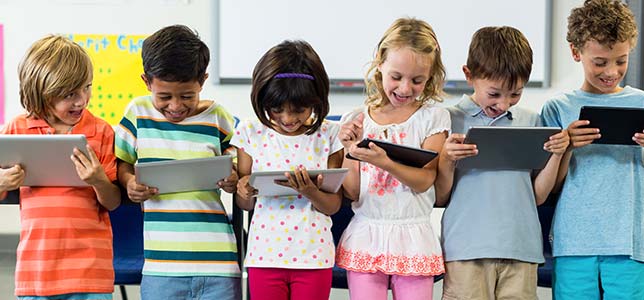
One of the technology implementation issues that I would like to address when I have my own classroom is that of cyber-bullying. A solution I could try to put into place to attempt to fix this dire problem is first by educating my students on the actual problem and then by creating a program where students are challenged to post kind things about one another and be kind to one another face to face. To educate my students, I could read specific examples of real life students who have been cyber-bullied and then talk to the class about the consequences for all parties involved if cyber-bullying becomes a real problem in my classroom. Then, I could tell the kids about a challenge for them to be kind, both online and in the classroom. If the students do a good job at my challenge, then I can give them a reward, such as throwing them a pizza party. Another issue that I would like to address in my classroom is that of the digital divide. The solution I will try to put into place will be to provide as many opportunities as possible for all students to use technology throughout the day in our lessons, because not all of the students will go home to technology. I could also come up with an after-school program where children that don't have access to technology at their homes can stay at school for an hour extra and learn basic technological skills and use the technology how they would like (within reason). A last technology implementation issue I would like to address in my classroom would be academic honesty. While this issue is a bit harder to come up with solutions, I will still try to implement plagiarism policies where I double check each student's citations and possibly run their papers and projects through a system that can check for plagiarism. I will also teach the kids about the consequences they can face if they do cheat and get caught, such as being suspended, expelled, or failing. 

Image result for classroom technology

Image Source: https://thejournal.com/articles/2017/06/29/2-in-3-parents-say-classroom-tech-is-key-to-student-futures.aspx Creative Commons License
This work is licensed under a Creative Commons Attribution 4.0 International License.
at September 18, 2019 No comments:
Email ThisBlogThis!Share to XShare to FacebookShare to Pinterest
Older Posts Home
Subscribe to: Posts (Atom)

Blog Journal 11

Learning about data collection and reporting has been very beneficial in helping me understand how I will work as a teacher. I think I will...

Tweets by AlyssaDepury

Search This Blog

Pages

  • Home

About Me

Alyssa DePury
View my complete profile

Report Abuse

Blog Archive

  • November 2019 (2)
  • October 2019 (7)
  • September 2019 (3)
  • August 2019 (1)
Travel theme. Powered by Blogger.